dolr - Personal Dashboard Redesign
Reducing Cognitive Load & Improving Retention for First-Time Budgeters
dolr - Personal Finance Dashboard Redesign
Reducing Cognitive Load & Improving Retention for First-Time Budgeters
dolr - Personal Finance Dashboard Redesign
Reducing Cognitive Load & Improving Retention for First-Time Budgeters
1.Overview
2.UX Problems
3.Who I designed For
4.Ux Goals
5.Heuristics & Research insights
6.Info-Architect Redsign
7.Key Design Decisions
8.Flow Improvements
9.Validation & Impact
10.Final outcome
1. Overview
Most personal finance apps scare beginners away before they form a habit. The dashboards are dense, graph-heavy, and overloaded with numbers that require emotional and cognitive effort to understand.
I redesigned the dashboard experience for a mobile money-management app with a clear objective:
Make money feel simple, intuitive, and calming — especially for first-time budgeters.
My focus was to restructure information hierarchy, reduce overwhelm, and turn the expense-logging action into a 3-second habit.
1. Overview
Most personal finance apps scare beginners away before they form a habit. The dashboards are dense, graph-heavy, and overloaded with numbers that require emotional and cognitive effort to understand.
I redesigned the dashboard experience for a mobile money-management app with a clear objective:
Make money feel simple, intuitive, and calming — especially for first-time budgeters.
My focus was to restructure information hierarchy, reduce overwhelm, and turn the expense-logging action into a 3-second habit.
1. Overview
Most personal finance apps scare beginners away before they form a habit. The dashboards are dense, graph-heavy, and overloaded with numbers that require emotional and cognitive effort to understand.
I redesigned the dashboard experience for a mobile money-management app with a clear objective:
Make money feel simple, intuitive, and calming — especially for first-time budgeters.
My focus was to restructure information hierarchy, reduce overwhelm, and turn the expense-logging action into a 3-second habit.
2. Problem
The Reality of Money Apps
A large portion of churn happens within the first week, not because the product lacks features, but because:
Users feel overwhelmed
They can’t interpret the dashboard quickly
The interface feels like “work”
Adding an expense takes too many steps
Data is thrown at them instead of explained
To address this, the dashboard needed to become:
simpler
more guiding
and aligned with actual user priorities
2. Problem
The Reality of Money Apps
A large portion of churn happens within the first week, not because the product lacks features, but because:
Users feel overwhelmed
They can’t interpret the dashboard quickly
The interface feels like “work”
Adding an expense takes too many steps
Data is thrown at them instead of explained
To address this, the dashboard needed to become:
simpler
more guiding
and aligned with actual user priorities
2. Problem
The Reality of Money Apps
A large portion of churn happens within the first week, not because the product lacks features, but because:
Users feel overwhelmed
They can’t interpret the dashboard quickly
The interface feels like “work”
Adding an expense takes too many steps
Data is thrown at them instead of explained
To address this, the dashboard needed to become:
simpler
more guiding
and aligned with actual user priorities
3. Who I Designed For
Beginner Budgeters
People who want to track their money but aren’t “financial people”:
College students
First jobs / early career
Young adults setting their first budgets
Behaviour Patterns
They abandon dashboards that feel “too analytical”
They don’t dig deep for insights
They only trust what’s visible upfront
They respond better to simple visuals than long summaries
3. Who I Designed For
Beginner Budgeters
People who want to track their money but aren’t “financial people”:
College students
First jobs / early career
Young adults setting their first budgets
Behaviour Patterns
They abandon dashboards that feel “too analytical”
They don’t dig deep for insights
They only trust what’s visible upfront
They respond better to simple visuals than long summaries
3. Who I Designed For
Beginner Budgeters
People who want to track their money but aren’t “financial people”:
College students
First jobs / early career
Young adults setting their first budgets
Behaviour Patterns
They abandon dashboards that feel “too analytical”
They don’t dig deep for insights
They only trust what’s visible upfront
They respond better to simple visuals than long summaries
Simple, User-first finance experience
Simple, User-first finance experience
Simple, User-first finance experience
4. UX Goals
To translate user behaviour into product decisions, I set four clear goals:
Reduce cognitive load by restructuring the dashboard to reflect human mental models.
Make the primary action—“Add Expense”—instant.
Surface only high-priority information above the fold.
Use visuals and cues to guide spending behaviour, not overwhelm users with data.
4. UX Goals
To translate user behaviour into product decisions, I set four clear goals:
Reduce cognitive load by restructuring the dashboard to reflect human mental models.
Make the primary action—“Add Expense”—instant.
Surface only high-priority information above the fold.
Use visuals and cues to guide spending behaviour, not overwhelm users with data.
4. UX Goals
To translate user behaviour into product decisions, I set four clear goals:
Reduce cognitive load by restructuring the dashboard to reflect human mental models.
Make the primary action—“Add Expense”—instant.
Surface only high-priority information above the fold.
Use visuals and cues to guide spending behaviour, not overwhelm users with data.
5. Heuristics & Research Insights
From mining user reviews, app store feedback, Reddit discussions, and competitor analysis, I learned:
Users don’t understand dashboards with too many equal-weight cards.
They want reassurance: “Am I on track or not?”
They log expenses impulsively — so the CTA must be unmistakable.
Visual categories are easier to digest than text-heavy reports.
A simple bar chart communicates spending boundaries better than a complex line graph.
This shaped the information architecture.
5. Heuristics & Research Insights
From mining user reviews, app store feedback, Reddit discussions, and competitor analysis, I learned:
Users don’t understand dashboards with too many equal-weight cards.
They want reassurance: “Am I on track or not?”
They log expenses impulsively — so the CTA must be unmistakable.
Visual categories are easier to digest than text-heavy reports.
A simple bar chart communicates spending boundaries better than a complex line graph.
This shaped the information architecture.
5. Heuristics & Research Insights
From mining user reviews, app store feedback, Reddit discussions, and competitor analysis, I learned:
Users don’t understand dashboards with too many equal-weight cards.
They want reassurance: “Am I on track or not?”
They log expenses impulsively — so the CTA must be unmistakable.
Visual categories are easier to digest than text-heavy reports.
A simple bar chart communicates spending boundaries better than a complex line graph.
This shaped the information architecture.
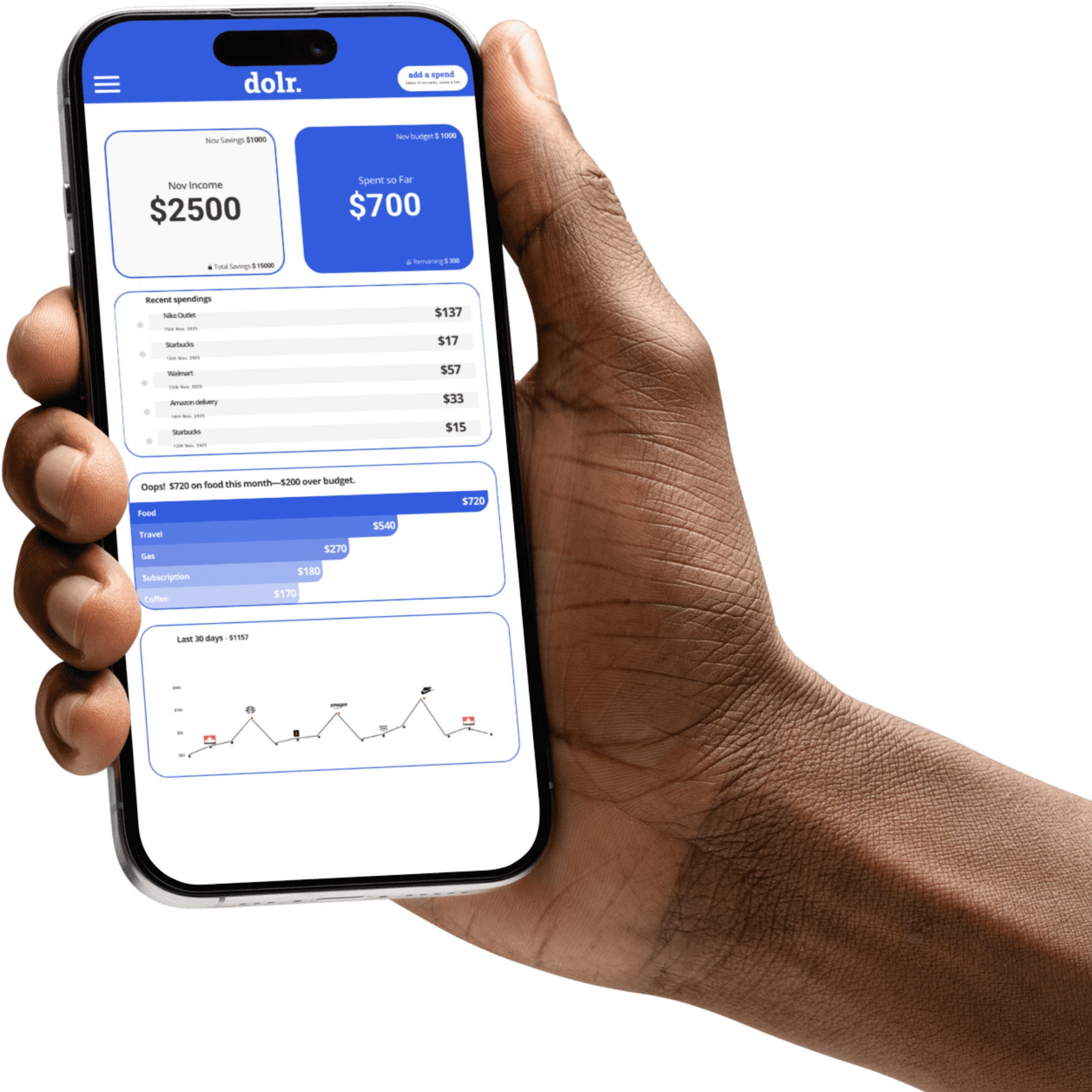
dolr.
add a spend
takes 12 seconds, saves a ton
Nov Savings $1000
Nov Income
$2500
Total Savings $ 15000
Nov budget $ 1000
Spent so Far
$700
Remaining $ 300
Recent spendings
Nike Outlet
15th Nov, 2025
$137
Starbucks
15th Nov, 2025
$17
Walmart
12th Nov, 2025
$57
Amazon delivery
14th Nov, 2025
$33
Starbucks
12th Nov, 2025
$15
Oops! $720 on food this month—$200 over budget.
Food
$720
Travel
$540
Gas
$270
Subscription
$180
Coffee
$170
Last 30 days - $1157
$500
$100
$50
$10
$0
Oct 1-7
Oct 8-14
Oct 15-22
Oct 23-31
dolr.
add a spend
takes 12 seconds, saves a ton
Nov Savings $1000
Nov Income
$2500
Total Savings $ 15000
Nov budget $ 1000
Spent so Far
$700
Remaining $ 300
Recent spendings
Nike Outlet
15th Nov, 2025
$137
Starbucks
15th Nov, 2025
$17
Walmart
12th Nov, 2025
$57
Amazon delivery
14th Nov, 2025
$33
Starbucks
12th Nov, 2025
$15
Oops! $720 on food this month—$200 over budget.
Food
$720
Travel
$540
Gas
$270
Subscription
$180
Coffee
$170
Last 30 days - $1157
$500
$100
$50
$10
$0
Oct 1-7
Oct 8-14
Oct 15-22
Oct 23-31
dolr.
add a spend
takes 12 seconds, saves a ton
Nov Savings $1000
Nov Income
$2500
Total Savings $ 15000
Nov budget $ 1000
Spent so Far
$700
Remaining $ 300
Recent spendings
Nike Outlet
15th Nov, 2025
$137
Starbucks
15th Nov, 2025
$17
Walmart
12th Nov, 2025
$57
Amazon delivery
14th Nov, 2025
$33
Starbucks
12th Nov, 2025
$15
Oops! $720 on food this month—$200 over budget.
Food
$720
Travel
$540
Gas
$270
Subscription
$180
Coffee
$170
Last 30 days - $1157
$500
$100
$50
$10
$0
Oct 1-7
Oct 8-14
Oct 15-22
Oct 23-31
6. Information Architecture Redesig
Before
Typical dashboards present:
10–12 metrics at once
blurred priority levels
multiple CTAs
deeply nested categories
no clear sense of “What should I look at first?”
After (My IA Strategy)
I applied a three-tier priority system:
Primary (Always Visible)
The essential “state of the month” snapshot:
Budget
Remaining balance
Monthly spent
These represent what every beginner cares about first.
Secondary (One Tap Down)
Contextual, but not urgent:
Total income
Monthly savings
Total savings
Tertiary (Scroll)
Deeper insights:
30-day spending trends
Recent transactions
Category-level expenses
This progressive disclosure keeps the top clean while still giving depth to curious users
6. Information Architecture Redesig
Before
Typical dashboards present:
10–12 metrics at once
blurred priority levels
multiple CTAs
deeply nested categories
no clear sense of “What should I look at first?”
After (My IA Strategy)
I applied a three-tier priority system:
Primary (Always Visible)
The essential “state of the month” snapshot:
Budget
Remaining balance
Monthly spent
These represent what every beginner cares about first.
Secondary (One Tap Down)
Contextual, but not urgent:
Total income
Monthly savings
Total savings
Tertiary (Scroll)
Deeper insights:
30-day spending trends
Recent transactions
Category-level expenses
This progressive disclosure keeps the top clean while still giving depth to curious users
6. Information Architecture Redesig
Before
Typical dashboards present:
10–12 metrics at once
blurred priority levels
multiple CTAs
deeply nested categories
no clear sense of “What should I look at first?”
After (My IA Strategy)
I applied a three-tier priority system:
Primary (Always Visible)
The essential “state of the month” snapshot:
Budget
Remaining balance
Monthly spent
These represent what every beginner cares about first.
Secondary (One Tap Down)
Contextual, but not urgent:
Total income
Monthly savings
Total savings
Tertiary (Scroll)
Deeper insights:
30-day spending trends
Recent transactions
Category-level expenses
This progressive disclosure keeps the top clean while still giving depth to curious users
7. Key Design Decisions & Rationale
A. Primary CTA: Add Expense (3-second interaction)
Users need this daily. So I:
moved it to a central, prominent location(Z pattern)
reduced competing elements around it
ensured one-handed usability
Why this matters:
Fast actions = more usage = stronger habit formation.
B. Dashboard Cards Based on Human Mental Models
Users understand their money in four simple buckets:
What’s left in the budget
What I’ve spent
What I earned
What I saved
Instead of overwhelming them with numbers, I turned these into:
clean, high-contrast cards
clear labels
single-glance insights
This reduces cognitive load and matches how people actually think.
C. Over-Budget Alerts (Visual Guidance)
Introducing:
color-coded warnings
bar charts that “fill” as spending increases
clear notification when a category exceeds the limit
This shifts the app from passive (“Here’s the data”) to active (“Here’s what you should pay attention to”).
D. 30-Day Trend Visualization
Instead of a bulky analytics page, users get:
one clean graph
recognizable icons
trend lines that explain spending behavior over time
This supports self-awareness without intimidating users.
7. Key Design Decisions & Rationale
A. Primary CTA: Add Expense (3-second interaction)
Users need this daily. So I:
moved it to a central, prominent location(Z pattern)
reduced competing elements around it
ensured one-handed usability
Why this matters:
Fast actions = more usage = stronger habit formation.
B. Dashboard Cards Based on Human Mental Models
Users understand their money in four simple buckets:
What’s left in the budget
What I’ve spent
What I earned
What I saved
Instead of overwhelming them with numbers, I turned these into:
clean, high-contrast cards
clear labels
single-glance insights
This reduces cognitive load and matches how people actually think.
C. Over-Budget Alerts (Visual Guidance)
Introducing:
color-coded warnings
bar charts that “fill” as spending increases
clear notification when a category exceeds the limit
This shifts the app from passive (“Here’s the data”) to active (“Here’s what you should pay attention to”).
D. 30-Day Trend Visualization
Instead of a bulky analytics page, users get:
one clean graph
recognizable icons
trend lines that explain spending behavior over time
This supports self-awareness without intimidating users.
7. Key Design Decisions & Rationale
A. Primary CTA: Add Expense (3-second interaction)
Users need this daily. So I:
moved it to a central, prominent location(Z pattern)
reduced competing elements around it
ensured one-handed usability
Why this matters:
Fast actions = more usage = stronger habit formation.
B. Dashboard Cards Based on Human Mental Models
Users understand their money in four simple buckets:
What’s left in the budget
What I’ve spent
What I earned
What I saved
Instead of overwhelming them with numbers, I turned these into:
clean, high-contrast cards
clear labels
single-glance insights
This reduces cognitive load and matches how people actually think.
C. Over-Budget Alerts (Visual Guidance)
Introducing:
color-coded warnings
bar charts that “fill” as spending increases
clear notification when a category exceeds the limit
This shifts the app from passive (“Here’s the data”) to active (“Here’s what you should pay attention to”).
D. 30-Day Trend Visualization
Instead of a bulky analytics page, users get:
one clean graph
recognizable icons
trend lines that explain spending behavior over time
This supports self-awareness without intimidating users.
8. Flow Improvements
Before
App → dashboard overload → find tiny add button → enter details → return to messy home.
After
Open app → big Add Expense → add in 3 seconds → dashboard updates instantly.
Result:
A smoother loop that supports daily habits.
8. Flow Improvements
Before
App → dashboard overload → find tiny add button → enter details → return to messy home.
After
Open app → big Add Expense → add in 3 seconds → dashboard updates instantly.
Result:
A smoother loop that supports daily habits.
8. Flow Improvements
Before
App → dashboard overload → find tiny add button → enter details → return to messy home.
After
Open app → big Add Expense → add in 3 seconds → dashboard updates instantly.
Result:
A smoother loop that supports daily habits.
9. Validation & Expected Impact
Even without live metrics, I defined measurable objectives that align with product goals:
What I’d measure:
Time to complete an expense entry
Dashboard comprehension (can users interpret it correctly?)
Daily active usage
7-day retention
Drop-off after first session
Expected Outcomes:
20–30% faster expense logging
Higher dashboard clarity (80%+ comprehension)
10–18% increase in habit formation
Lower first-week churn
These metrics are realistic and used industry-wide for habit-based apps.
9. Validation & Expected Impact
Even without live metrics, I defined measurable objectives that align with product goals:
What I’d measure:
Time to complete an expense entry
Dashboard comprehension (can users interpret it correctly?)
Daily active usage
7-day retention
Drop-off after first session
Expected Outcomes:
20–30% faster expense logging
Higher dashboard clarity (80%+ comprehension)
10–18% increase in habit formation
Lower first-week churn
These metrics are realistic and used industry-wide for habit-based apps.
9. Validation & Expected Impact
Even without live metrics, I defined measurable objectives that align with product goals:
What I’d measure:
Time to complete an expense entry
Dashboard comprehension (can users interpret it correctly?)
Daily active usage
7-day retention
Drop-off after first session
Expected Outcomes:
20–30% faster expense logging
Higher dashboard clarity (80%+ comprehension)
10–18% increase in habit formation
Lower first-week churn
These metrics are realistic and used industry-wide for habit-based apps.
10. Final Outcome
The final dashboard experience achieves:
A calmer interface that supports beginners
A clear priority structure that eliminates overwhelm
A primary action that forms consistent, daily behavior
A visual, human-friendly representation of money
A dashboard that teaches users spending awareness without lecturing them
In short:
A money management app that feels like a supportive guide, not a spreadsheet.
10. Final Outcome
The final dashboard experience achieves:
A calmer interface that supports beginners
A clear priority structure that eliminates overwhelm
A primary action that forms consistent, daily behavior
A visual, human-friendly representation of money
A dashboard that teaches users spending awareness without lecturing them
In short:
A money management app that feels like a supportive guide, not a spreadsheet.
10. Final Outcome
The final dashboard experience achieves:
A calmer interface that supports beginners
A clear priority structure that eliminates overwhelm
A primary action that forms consistent, daily behavior
A visual, human-friendly representation of money
A dashboard that teaches users spending awareness without lecturing them
In short:
A money management app that feels like a supportive guide, not a spreadsheet.
1.Overview
2.UX Problems
3.Who I designed For
4.Ux Goals
5.Heuristics & Research insights
6.Info-Architect Redsign
7.Key Design Decisions
8.Flow Improvements
9.Validation & Impact
10.Final outcome
1.Overview
2.UX Problems
3.Who I designed For
4.Ux Goals
5.Heuristics & Research insights
6.Info-Architect Redsign
7.Key Design Decisions
8.Flow Improvements
9.Validation & Impact
10.Final outcome
1.Overview
2.UX Problems
3.Who I designed For
4.Ux Goals
5.Heuristics & Research insights
6.Info-Architect Redsign
7.Key Design Decisions
8.Flow Improvements
9.Validation & Impact
10.Final outcome
1.Overview
2.UX Problems
3.Who I designed For
4.Ux Goals
5.Heuristics & Research insights
6.Info-Architect Redsign
7.Key Design Decisions
8.Flow Improvements
9.Validation & Impact
10.Final outcome